Pages

Monday, May 23, 2016

Games Games Games Games Games!


lol, if that title didn't put this song into your head....you might've been born in the wrong generation.

Seriously, or not.  I love games.  Not mind games, but the kind that get our kids engaged in the classroom!  There are so many platforms available to facilitate this type of learning & I thought I'd dive into a few.  One at a time.....we'll just get our toes wet tonight.

One of my most favorite online games is kahoot.it !  Ever heard of it?  If not, saddle up.....it's one of the coolest games out there!  You can take literally any question set you can dream of & make it timed response game.  Who can answer first?  Who can answer correctly?  No points for incorrect answers, so think before you buzz in with that answer!  Sorry, I'm getting ahead of myself.
Check it out. go to create.kahoot.it  Start a free account...it's quick and painless.  Now you can start creating quizzes!  You can create your own kahoots, or search a plethora of premade kahoots in their user database.  
I would always recommend previewing files before you use them with your kiddos.  If you want to make your own question set....even easier.
On your dashboard, near the bottom, look for the "Create a new kahoot" button.  There are several types of games you can play. Discussions and surveys are typically just one question & lend themselves to great lesson openers....hint, hint, hint.
Then there's the tried and true QUIZ!  Simply click the button & follow the directions through.
You will have to name your quiz first & give them a little info about it.  You can change the settings here--language can be changed to spanish or make the whole game private....don't share it with the world!

Now you get to add your questions.  Word these carefully!
If you have questions, you need answers too!  They require at least 2 answer choices, but you can always add more if needed.  
Now you're ready to Kahoot....all you need is your teams! 
When you finish your Kahoot, it will generate a unique Game Pin.  This is what your students need to join your game!  
Students will go to kahoot.it and enter this PIN 
They can play as a team, or, if you have a 1:1 classroom, they can play by themselves.  Team play is a new feature.  They will play it essentially the same way, but all their names will be displayed on the screen, along with the team name.  
Each team has to choose a team name--this is always good for a few giggles.  If choosing team play, the team captain will enter all the players names.  

Now lets play!  The teacher will start the game  from their computer once all teams have joined.  
Questions would be projected on your Smartboard, and each team gets "think time" before they are allowed to buzz in.  You can even turn on some fun game show music in the settings to create even more suspense as they answer each question. 
Student's screen looks like this....the faster they buzz in with a correct answer; the more points they get!  
Once all teams have answered, you can move to an answer grid.  This will give you instant feedback as to who answered correctly.  It won't show who got the questions right/ wrong--simply a bar graph of how many teams answered with which response.  

There is of course a point board.  It will change after each question....as new leaders take the pack!  

My students absolutely love this game.  It makes even boring STAAR practice into a fun game!
So many fun ways to use this next year.  I would love to try classroom vs. classroom remotely.  
How fun would that be?!  
mind=blown

  I hope you give kahoot a whirl sometime.....let me know how it goes!  
#3moredays 


Sunday, March 20, 2016

Picasa Photo Collage Tutorial

So,,,,this was a tutorial I made by necessity.  I was trying to help a friend with a photo collage, and to say "I'm a little rusty" would be an understatement.

So, this is basically to reteach myself how to use this uber-useful platform.  For me, this is so handy for creating previews for my Teachers Pay Teachers products.  A collage that shows all the slides a customer would get, yes please!  Once you get really good at it--creating these collages will be cake!
Here we go! 
 Google Picasa download
Download the google software.  It's super quick...Click the pic to take you to the download site

It's free....make sure you have a google account.  You'll need to sign in to use Picasa

Finish your Powerpoint project.  You have to save as a .pdf to upload to TpT, but you also need to save them as picture files (.jpeg) to use them in Picasa.

Find Picasa. For me it's always in my Red Application folder.  Once open, you'll look for the folder you saved your pics in....it should be near the top of your files. 
My favorite part...just click the collage button to create TpT magic! Who doesn't love magic?!
Now you can see your collage.  It's totally fine the way it is, but I like to spread out the pics. This helps to see everything.  Just click & drag! 
I'm not sure why you have to do this step, but you have to do this step.  Takes all of 5 seconds & then your beautiful collage is ready to go! 
Now you're finished & ready to navigate your TpT upload.  I always make this the picture that pops up for the product preview, but you can def use it as a preview pic! 

That's it! Easy Peasy.  Looks like alot, but it really goes fast once you get the hang of it.  
No really. Enjoy & let me know if you're having any issues! 
#web2.0

Saturday, October 3, 2015

Audio Boom tutorial

It's Fall Y'all!  A new year, a new series of trainings.  I've had so much response to my AudioBoom training, I'm posting my slides here.  

This is a great free app for teachers!  It allows you to record yourself and generate a QR code linked to the recording.  It's so simple, anyone can do it!

Can you say listening centers?!  Tape a QR code to the inside of the book & your students can scan it and listen and follow along in the book.  I use it when I send books to my nephew.  He's an emergent reader and listening and tracking text is part of the learning process.  lol, I also use my dog to bark when it's time to turn the page....I'm sure that helps ramp up the "fun factor."

However you use it, please, please, please give this app a try & let me know how you like it!


#edTech #iTeachToo


Thursday, October 1, 2015

October Currently!


YAY!  I't currently time!

I am listening to Grey's Anatomy at the moment.  I am sooooooo excited TGIT is back with new episodes.  I <3 that I now have a reason to watch 3 straight hours of TV on Thursday.

I love this time of year.  Weather is getting cooler <kind of.>  In Texas, fall weather in October means it only gets to the low 80s.  We are in luck this weekend, because the lows are in the 60s!

Yeah....secret....must.not.waiver.  All will be revealed later, or when someone spills the beans (not me!)


OMG> Boots.  Must have.  I am #obsessed with them.  I do limit myself to one pair of boots each fall.....otherwise it's be outta control! These are the ones I'm just itching to buy this season.  I love that they have stretch across the back.  They get so tight when you get multiple layers....I feel like stretch would be more comfortable.  Must. Wait. for Friends and Family Sale.  Must. Wait.

Nuff said.

Last weekend was tons of fun.  All my brothers and I got together and just hung out. No distractions, just our families.  #perfect

We love linking up with Farley each month.
Check out her blog to see what she's up to.


Tuesday, September 29, 2015

Head Hunters! A sight word game

The art room is officially in full swing!  So many different projects working at one time, but sight words seem to be what we need the most practice on.  Kindergarten and first grade are exploring the Elements of Art....specifically color.  They can verbalize the colors, but most are having trouble identifying the color words.  We are practicing at every turn of our project!  Want to leave? Read a color word!  I literally walk around all day with a different color word around my neck....if they want to ask a question, they have to read the word.  Practice, practice, practice!

Enter the warm up game.  I saw this on Pinterest (see original post here), detailing practice for regular sight words.  Inspired by this game.....
I wanted to use it for our color words.  I whipped up a unit for the art room.  One set is just the primary colors, and the other is the entire color wheel.  Just click on the pics to download it for free!

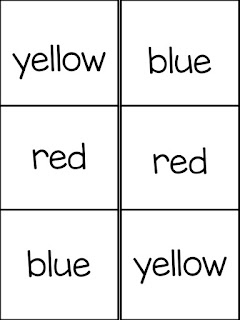
Set up is easy.  Type your kiddos names in the editable box.  Print out sheets for each student.  Print the word cards on cardstock.  Give each kiddo a word card to tape to their forehead.  They walk around and read the name on their friend's forehead.  Have them draw a line from the student's name to the word they read.  Easy Peasy.
 Head Hunters Game
If you'd like the file, just click on either of the pics to download the free file!
Enjoy!

Thanks to Alison at Hurray for FDK for the idea!
#practicemakesperfect