seriously.....
I've gotten a million messages to update my behavior calendars for the current school year. Now that I've got a little time on my hands....they're up!
These are great for tracking daily behavior in your classroom. They are editable, meaning you can insert a text box and write whatever notes or holidays you'd like!
If you've already bought them off TpT, you can download the update anytime. If not, I'm in a giving mood today. You can download a copy for free. Today only! Tell your friends....stop on by & get it while it's free! Who doesn't love a freebie?!
*Update*
Sorry, flash freebie has sadly disappeared. But you can still find it in my TpT store!!
Have you ever thought to yourself....What are these black and white monsters? Well, I'm here today to answer that for you!
They're basically the google maps of the computer world! They will direct you to your destination using the most basic and simplest route. That's the simple explanation. The computer nerd in me wants to tell you it's a machine-readable code consisting of an array of black and white squares, typically used for storing URLs or other information for reading by the camera on a smartphone.
All you really need to know is that is a simple way to get your students information. They can access websites, contact information, videos, or pictures by scanning a code with a number of free scanning apps.
These are a teacher sanity saver if you like for students to follow you to certain websites, but don't want them to have to type in the address & risk going to the wrong place.
They are super simple to make and use. There are tons of free QR code generating sites. I like QRStuff.com I like this one because:
it's free (no account needed)
it's easy to use
To start: follow the link to your QR code generator and literally....follow the numbers!
1. choose your data type. What or where do you want your students to go to/ see? You can see, their list is quite expansive. I usually just send them to a website URL, but there are dozens of options based on your project.
Then it will ask you for the file, or in my case, the website URL. Couldn't be simpler....just copy and paste the whole URLhere. I usually don't mess with the Encoding options, bc I'm just using them to print for my students....not putting them on a website anywhere.
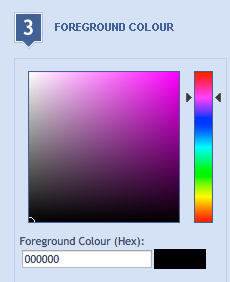
3. Next, wanna get fancy?! Change the color of your QR code...it can be any color in the rainbow, not just black and white!
4. Then on the right side of your screen, you'll see your QR code preview. Click on the "Download QR Code" button below your preview to download your QR code as a picture file. You can then open this in your favorite go-to program.....I like PowerPoint
If you want to get super fancy, they've added another free feature. Create a visual QR code. This will take your QR code and mesh it with your own photo or any number of stock pictures they have available. Pretty rad!
That's basically it. Now what? Be creative! Think simply. Link these codes when you need your kiddos to go to a website. Then think bigger....scavenger hunts! Pictures for a sponge activity! How to videos on their homework!
Oops, I almost forgot! There are hundred of free scanner apps available. Here's a list of the top 7 for iOs and Android. I like QR Reader. That's literally what it's called. I've found it to be the easiest and fastest I've run across.
Here's a little freebie, cause you made it all the way to the end...click the pic for a free sharable template
Yesterday, I posted about the ins and outs of Padlet.com. If you missed it, click here
Now, for the fun stuff.....what can you do with it? Well, the possibilities are seriously endless, but....I thought I'd post a few ideas in the coming days.
#1
Use it as an exit ticket for your lesson, a "show what you know" tool. Your students can post a picture and an idea about your lesson. Keep it simple and just post pictures, or more advanced students can type their ideas and thoughts about the topic.
#2
Add pictures and links to short videos. Students could make reports on different subjects.
Or.....Teachers could use it to drive a lesson. I'm a big fan of powerpoint or some sort of presentation software to keep me on topic as we go through lessons, and this does the same job, just a more direct route.
What about you? How have you used this versatile tool in your classroom?
well, I guess I'll have way more freetime for bloggy posts now that my role has changed at school! Saddle up!
wallwisher er. PADLET!!
This is an oldie, but goodie! It's basically a blank piece of online paper. More of a collaborative whiteboard, user friendly on both ends of the spectrum--creation and user.
One word to describe: VERSATILE. Def not a #onetrickpony, seriously this tool is the swiss army knife of edTech.
Math teacher wanting to see answers to a word problem....bust out those devices & show what you know! Reading teacher with a question about what descriptive words do you see? The examples could go on and on....
Another bonus: kids don't have to login to join a padlet. They can login as guests to ease the process of getting them online.
I'm sure most of you are familiar with the Padlet website. Create a free account, it takes literally 2 minutes. Then you're free to create as many Padlet boards as your heart desires. They've tweaked the user interface a little, added some new groovy features.
If you click the settings "cog" at the top of your dashboard, you can easily change the Title and Description of your board. This is where I pose my question, and then elaborate on the types of responses I'm looking for.
New with this last update is the wallpaper choices! There are dozens of fun and engaging backgrounds for your questions.......i<3 the donuts!
Most exciting is the APP! Yes, they've finally added both iOs and Android apps. Your students don't have to be on an internet device anymore, they can access it through the app! And so can you!
This also makes posting links, pictures, and videos easier. All they have to do is click anywhere on the board and upload their pics straight from their device.
If you choose the freeform response format, you'll be able to click and drag their responses on a Smartboard.....sort them! This is a great way to get them to think critically about the responses that they're seeing. If they have to sort them & think about the categories they could fall into = instant rigor.
Last tip: use a QR code to link to your Padlet. When you create your board, it will generate a unique address. You can roll the dice & have your students type this into their device
or, take that internet address and create a QR code for them to scan using that address. See this tutorial on creating QR codes in your classroom.
I hope you'll remember this easy little platform when you're planning your lessons for next year. Cause I know that's what you're doing this summer.....lesson planning. lol
lol, if that title didn't put this song into your head....you might've been born in the wrong generation.
Seriously, or not. I love games. Not mind games, but the kind that get our kids engaged in the classroom! There are so many platforms available to facilitate this type of learning & I thought I'd dive into a few. One at a time.....we'll just get our toes wet tonight.
One of my most favorite online games is kahoot.it ! Ever heard of it? If not, saddle up.....it's one of the coolest games out there! You can take literally any question set you can dream of & make it timed response game. Who can answer first? Who can answer correctly? No points for incorrect answers, so think before you buzz in with that answer! Sorry, I'm getting ahead of myself.
Check it out. go to create.kahoot.it Start a free account...it's quick and painless. Now you can start creating quizzes! You can create your own kahoots, or search a plethora of premade kahoots in their user database.
I would always recommend previewing files before you use them with your kiddos. If you want to make your own question set....even easier.
On your dashboard, near the bottom, look for the "Create a new kahoot" button. There are several types of games you can play. Discussions and surveys are typically just one question & lend themselves to great lesson openers....hint, hint, hint.
Then there's the tried and true QUIZ! Simply click the button & follow the directions through.
You will have to name your quiz first & give them a little info about it. You can change the settings here--language can be changed to spanish or make the whole game private....don't share it with the world!
Now you get to add your questions. Word these carefully!
If you have questions, you need answers too! They require at least 2 answer choices, but you can always add more if needed.
Now you're ready to Kahoot....all you need is your teams!
When you finish your Kahoot, it will generate a unique Game Pin. This is what your students need to join your game!
They can play as a team, or, if you have a 1:1 classroom, they can play by themselves. Team play is a new feature. They will play it essentially the same way, but all their names will be displayed on the screen, along with the team name.
Each team has to choose a team name--this is always good for a few giggles. If choosing team play, the team captain will enter all the players names.
Now lets play! The teacher will start the game from their computer once all teams have joined.
Questions would be projected on your Smartboard, and each team gets "think time" before they are allowed to buzz in. You can even turn on some fun game show music in the settings to create even more suspense as they answer each question.
Student's screen looks like this....the faster they buzz in with a correct answer; the more points they get!
Once all teams have answered, you can move to an answer grid. This will give you instant feedback as to who answered correctly. It won't show who got the questions right/ wrong--simply a bar graph of how many teams answered with which response.
There is of course a point board. It will change after each question....as new leaders take the pack!
My students absolutely love this game. It makes even boring STAAR practice into a fun game!
So many fun ways to use this next year. I would love to try classroom vs. classroom remotely.
How fun would that be?!
mind=blown
I hope you give kahoot a whirl sometime.....let me know how it goes!
So,,,,this was a tutorial I made by necessity. I was trying to help a friend with a photo collage, and to say "I'm a little rusty" would be an understatement.
So, this is basically to reteach myself how to use this uber-useful platform. For me, this is so handy for creating previews for my Teachers Pay Teachers products. A collage that shows all the slides a customer would get, yes please! Once you get really good at it--creating these collages will be cake!
Here we go!
Download the google software. It's super quick...Click the pic to take you to the download site
It's free....make sure you have a google account. You'll need to sign in to use Picasa
Finish your Powerpoint project. You have to save as a .pdf to upload to TpT, but you also need to save them as picture files (.jpeg) to use them in Picasa.
Find Picasa. For me it's always in my Red Application folder. Once open, you'll look for the folder you saved your pics in....it should be near the top of your files.
My favorite part...just click the collage button to create TpT magic! Who doesn't love magic?!
Now you can see your collage. It's totally fine the way it is, but I like to spread out the pics. This helps to see everything. Just click & drag!
I'm not sure why you have to do this step, but you have to do this step. Takes all of 5 seconds & then your beautiful collage is ready to go!
Now you're finished & ready to navigate your TpT upload. I always make this the picture that pops up for the product preview, but you can def use it as a preview pic!
That's it! Easy Peasy. Looks like alot, but it really goes fast once you get the hang of it.
No really. Enjoy & let me know if you're having any issues!





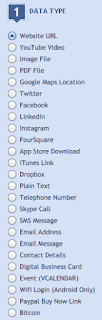 1. choose your data type. What or where do you want your students to go to/ see? You can see, their list is quite expansive. I usually just send them to a website URL, but there are dozens of options based on your project.